Tuesday, March 14, 2017

HP MSA Storage P2000 G3 - assigning new IP address using SSH


1. Login to  management console using SSH


2.  Show the current IP address setting using following command

  show network-parameter


3.  Change IP address of controller A using following command

set network-parameters ip <IP_ADDRESS> netmask <NETMASK> gateway <GATEWAY> controller a


4. Restart controller A

restart mc a


5. Change IP address of contoller B using following command

set network-parameters ip <IP_ADDRESS> netmask <NETMASK> gateway <GATEWAY> controller b


6. restart controller B

restart mc a


Thursday, March 9, 2017

RHEL 6.5 partition 3TB harddisk using gparted


RHEL 6.5 partition 3TB harddisk using gparted


 For my senario,the fdisk -l shows 3TB hdd connected as /dev/sdb


1. So started parted using ,
           parted /dev/sdb

2.  create gpt disk label,
           mklabel gpt


3. change unit to TB
           unit TB

4.  create 3TB partition
         mkpart primary 0.00TB 3.00TB


5. fdisk -l , shows that a new partition /dev/sdb1 is created of 3TB in size


5.   To format as EXT4 filesystem,
               mkfs.ext4 /dev/sdb1


Friday, February 10, 2017

Openstack Newton on CentOS 7 using packstack


1. Prerequisites

1.1 Hardware requirement 4GB RAM
1.2 $systemctl disable firewalld$systemctl stop firewalld$systemctl disable NetworkManager$systemctl stop NetworkManager$systemctl enable network$systemctl start network

2. Setup software repositories

2.1  yum install -y centos-release-openstack-newton


2.2 update the OS

yum update -y


3. Install packstack


4. Generate the answer file using packstack


5. Edit the answers.txt file and enable the required features..


6. Install openstack using the answer file


7.  Once the installation is complete , login to horizon using http://IP-address/dashboard
u: admin
p: password set for horizon in answer file


Saturday, November 5, 2016

Docker Installation on Fedora 24

Docker Installation on Linux - Fedora 24

1.  Update the fedora packages,

        #  dnf update


2.  Create the docker.repo file and add the following entries;

[dockerrepo]
name=Docker Repository
baseurl=https://yum.dockerproject.org/repo/main/fedora//
enabled=1
gpgcheck=1
gpgkey=https://yum.dockerproject.org/gpg


3. Now install the docker-engine 


4.  Now enable the docker service and start the docker.


5.  To test docker installation,


Docker Installation on Fedora 24

Docker Installation on Linux - Fedora 24

1.  Update the fedora packages,

        #  dnf update


2.  Create the docker.repo file and add the following entries;

[dockerrepo]
name=Docker Repository
baseurl=https://yum.dockerproject.org/repo/main/fedora//
enabled=1
gpgcheck=1
gpgkey=https://yum.dockerproject.org/gpg


3. Now install the docker-engine 


4.  Now enable the docker service and start the docker.


5.  To test docker installation,


Wednesday, October 19, 2016

VMware vcenter 5.5 - single sing on and Active directory Integration


How to add a user/group in ActiveDirectoy to VMware Single Sign on


1. Login to VMware vsphere web client
and go to vcenter servers and select the respective vcenter server and go to that page


2. Go to Manage >> Permissions >> Click "+" to add new user or group


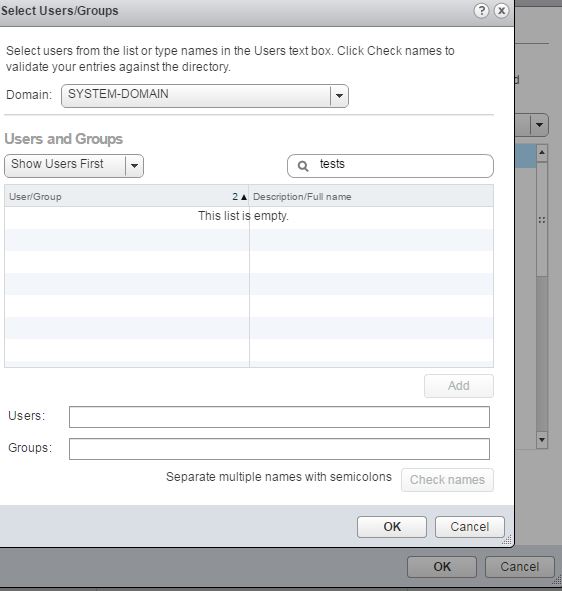
3. Click "Add" button to select the users/groups


 4.  Select the "domain" and using the search tab search for the user/group.
Once selected click "ok" to add.


5. Once completed, you can login to the vcenter using the added AD user.

Note : Assumption is that the server hostname is created and added under the same AD.

Wednesday, October 5, 2016

Puppet module install on puppetmaster


Puppet module install on puppet master from puppetforge online repository.


If your Puppet master server is behind a proxy server, set the following, replacing <PROXY IP> and <PROXY PORT> with the proxy’s IP address and port:

export http_proxy=http://<PROXY IP>:<PROXY PORT>
export https_proxy=http://<PROXY IP>:<PROXY PORT>


  1. To search for a puppet module , run the following command from the puppet master server.
puppet module search < module_name >

eg: 

puppet module search apache


 2. To  install the puppet module from the search result

puppet module install puppetlabs-apache


3.  The installed modules file can be found in the location /etc/puppetlabs/code/environments/production/modules/ [for puppet enterprise edition]